
The Hair tab
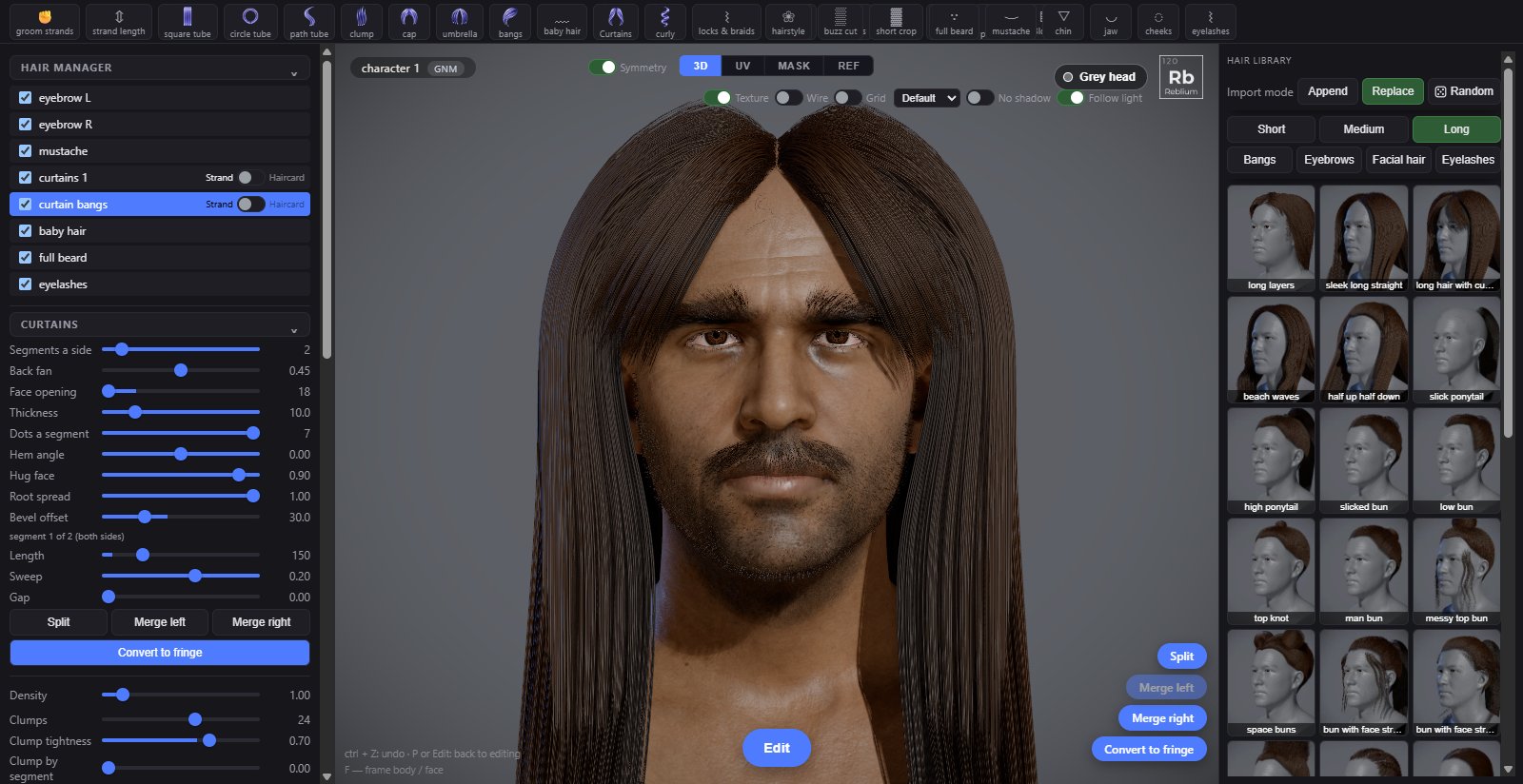
All hair lives on one tab, Hair, at the end of the strip. Long hair, short cuts, bangs, eyebrows, beards, eyelashes, hair cards and grooming are all tools on that one tab, and every piece of hair on the head is one row in one list.
Two ways hair is made
Every hair object is grown as real strands. They are made one of two ways, and you can mix them on one head:
- Grown from the skin. A hairstyle, a buzz cut, a beard, eyebrows and eyelashes are grown straight from the scalp or the face, and shaped with sliders: lengths, fade, comb, curl. See Short hair and Eyebrows, beards and eyelashes.
- Built from shapes. Long hair is blocked out with soft shapes you place on the head, called tubes, and every tube fills with strands. Caps, bangs, curtains, braids and ponytails are ready made sets of them. See Long hair.
Any hairstyle can then be drawn as hair cards instead of strands, the textured strips games use. See Hair cards. And any strands can be combed and lengthened by hand with a brush: see Grooming.
The shelf
While Hair is open, the shelf under the strip holds every hair tool. A click on a tool adds that hair to the head, or starts placing it. The left panel always shows the controls of the tool or object you are working on.
| Tools | What they make |
|---|---|
| groom strands, strand length | Open the grooming brushes: grab to bend strands, scale to lengthen or shorten them. See Grooming. |
| square tube, circle tube, path tube, clump, cap | Long hair shapes you place by hand. See Tubes, paths, clumps and caps. |
| umbrella, bangs, baby hair, Curtains, curly, locks & braids, cornrows, fringe, bun, ponytail, Blocks | Whole kinds of long hair in one press. See Long hair styles. |
| eyebrows | A pair of brows, each on four dots. See Eyebrows, beards and eyelashes. |
| hairstyle, buzz cut, short crop | Hair grown over the scalp from sliders. See Short hair. |
| full beard, mustache, chin, jaw, cheeks, eyelashes | Facial hair and lashes. See Eyebrows, beards and eyelashes. |
The Hair Manager
The Hair Manager at the top of the left panel lists every piece of hair on the head, one row each. Click a row to pick it: its controls appear under the list, and in Edit its dots and curves show on the head. You can also click the hair itself in the view.
| Control | What it does |
|---|---|
| Box | Shows or hides that object. |
| Name | Double click to rename it. Objects made with symmetry on come in pairs named L and R. |
| ⇄ | Mirrors a tube to the other side of the head, making its twin. |
| ⧉ | Duplicates it. |
| × | Deletes it. Ctrl+Z brings it back. |
| Strand, Haircard | On hairstyle rows: draw this hair as strands, or as hair cards made from it. See Hair cards. |
The hair library
The right panel is the hair library: ready made styles as pictures. A click puts a style on the head; every control stays yours to change afterwards.
| Control | What it does |
|---|---|
| Import mode | Append: what you pick joins what is on the head. Replace: it takes the place of what is there. Bangs and eyebrows are one of each, so a pick restyles them either way. Eyelashes are always replaced. Hair never takes off the brows or the facial hair. |
| Random | Puts on a random style from the category you are looking at. |
| Short | Above the ears: crops, fades, buzz cuts, pixies, short twists and afros. |
| Medium | Ear to shoulder: bobs, shags, mullets, shoulder curls and locs. |
| Long | Past the shoulders, and updos: buns, ponytails, braids and long locs. |
| Bangs | Bang styles: a click restyles the bang on the head, or lays a new one. |
| Eyebrows | Brow shapes. |
| Facial hair | Mustache and beard styles. In Append, a mustache style restyles only the mustache, a beard style only the beard. |
| Eyelashes | Lash styles. Their colour stays. |
Edit and Done
The pill under the view switches between two looks, and is named for the one it goes to. Edit shows the picked object's curves, dots and blockout shapes so you can shape it. Done hides every helper and shows the hair as it renders. P switches between them.
Grey head, at the top right of the view, shows the skin in one neutral grey while you edit hair, so only the hair carries colour. Leaving the hair tools brings the colour back.
Quality
Two settings decide how heavy the hair is in this browser, for every hair object. They are in the grooming panel and under hair on the Settings tab.
| Control | What it does |
|---|---|
| Rendering quality | Low: each strand a camera-facing line, the fastest. Med: a flat ribbon. High: a ribbon with more segments, for smooth curls. Curly hair and locks are always drawn as High. |
| Strand density | High grows each style as made. Med and Low grow fewer, thicker strands for slower machines. Realistic grows twice as many, thinner. |
| Card detail | Only while a hairstyle is set to Haircard. See Hair cards. |
Colour
Every hair object follows the character's hair colour unless you give it its own. The colour controls sit in the picked object's panel:
| Control | What it does |
|---|---|
| Natural colour | The colour comes from two pigments, like real hair. Picking a root or tip colour, or a template, dyes it instead; tick it again to go back to natural. |
| Melanin | Dark pigment: 0 platinum, then blond, light brown, brown, dark brown, 1 black. |
| Redness | The red pigment's share: 0 ash and cool, 0.5 warm, 1 auburn and ginger. |
| Root, Tip | A colour at the root and one at the tip. ↺ follows the character's colour again. |
| Templates | One click root and tip pairs. |
| Salt & pepper | The share of grey strands, 0 to 100 %. |
| Grey pattern | Where the grey starts: 0 at the front and parting, 0.5 even, 1 at the temples and above the ears first. |
Common problems
| What you see | Why | What to do |
|---|---|---|
| I cannot find the Haircard tab | There is none any more. | Use the Strand, Haircard switch on a hairstyle row in the Hair Manager. See Hair cards. |
| The hair has dots and curves all over it | You are in Edit. | Press Done or P. |
| The skin went grey | Grey head is on while you edit hair. | Press Grey head again, or leave the Hair tab. |
| The frame rate drops with long hair | High rendering quality or Realistic density. | Set Rendering quality or Strand density lower: it changes only this browser, not the character. |
| A slider does nothing while I drag it | Many strand sliders rebuild every strand, so they apply when you let go. | Let go of the slider. |