Long hair is built the way a sculptor blocks out a hairstyle: you lay soft blue shapes called tubes over the head, shape them with a few dots, and press Done to see every tube filled with real strands.
TabHairToolssquare tube, circle tube, path tube, clump, cap and the style tools on the shelfStylesMedium and Long in the hair libraryEdit, Donethe pill under the view, or PDotsTab switches between moving dots and sizing rings
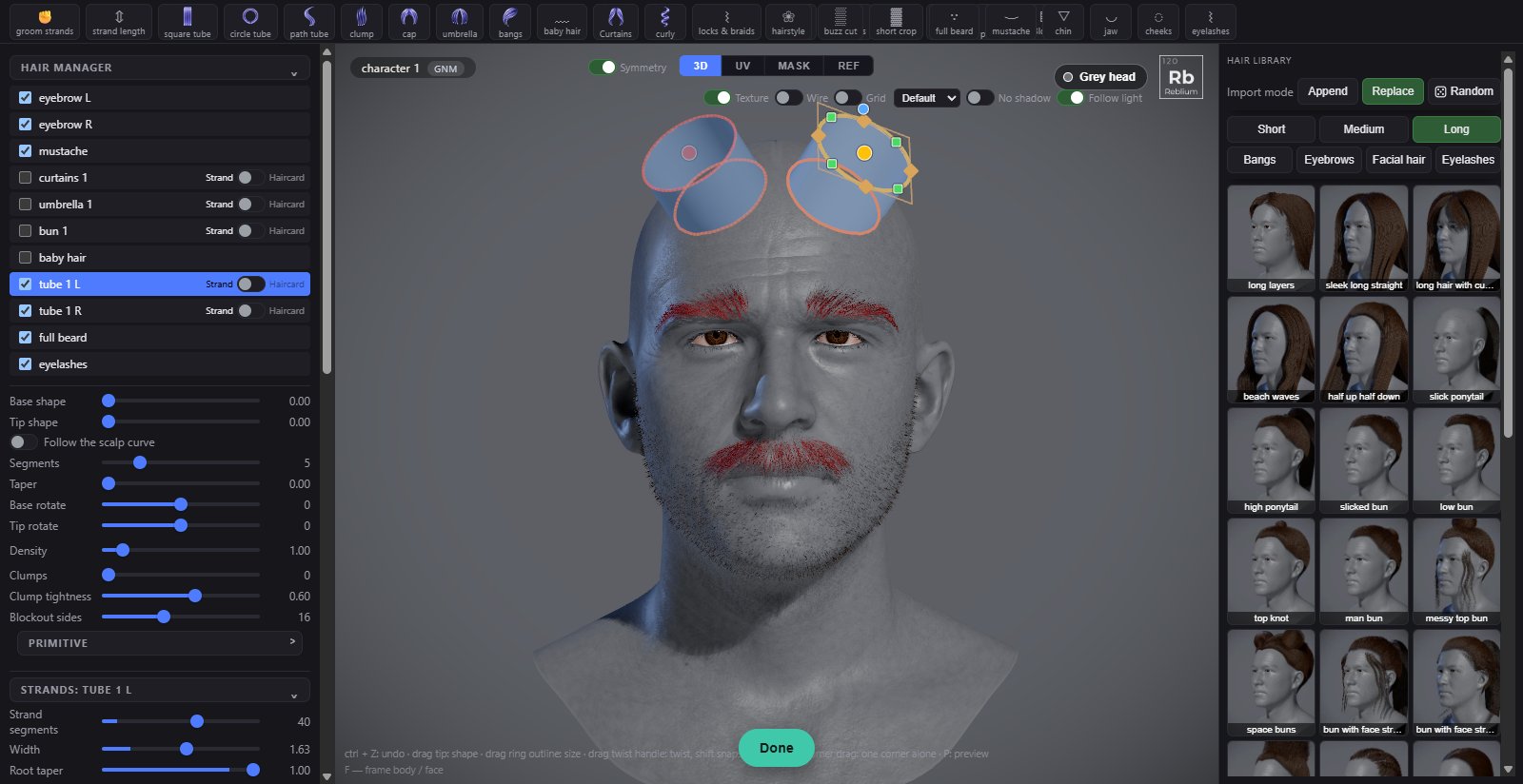
Two round tubes just placed with Symmetry on, tube 1 L and tube 1 R. The tip ring of tube 1 L is picked: its yellow dot, green corner squares, orange edge dots and blue knob.
How it works
A tube is pinned to the scalp by its base. It is made of rings, from the base ring on the skin to the tip ring, with the tube stretched over them. You never model the tube itself: you move, size and turn the rings, and the tube follows. Every tube is filled with strands that run from its base to its tip.
Open Hair. Click a style in the library's Medium or Long tab, or make a tube with a tool on the shelf. With Symmetry on, every new tube gets a twin on the other side.
In Edit, drag a tube's dots, drag a ring's outline to size it, or pick a ring for its handles.
Set the picked tube's shape, segments, taper and clumps in the left panel.
Press Done (or P) to see the strands, then set their look under strands: width, noise, curl and wave. Each object has its own.
Set the colour and the highlight. See The Hair tab.
The rings and their handles
Do this
What happens
Drag a dot
The ring moves, and the rings between the base and the tip follow, like a slinky.
Drag a ring outline
The ring grows or shrinks.
Click a dot
Picks that ring and shows its handles. The panel shows its radius and rotation.
Drag an orange edge dot
The ring's width or height: a round section becomes an oval.
Drag a green corner dot
Out squares the corners, in rounds them (base and tip rings only).
Drag the blue knob
Turns the ring. Shift snaps to 15 degrees.
Drag the base dot or the tube
Slides the whole tube over the head. The base stays on the skin.
Tab
Switches the dots between move and ring size.
The panel
At the top
Control
What it does
Cap spans, Umbrella sides, Bang style, Baby hair
Set before you press the cap, umbrella, bangs or baby hair tool: how many spans or sides, which bang style, front or rear baby hair.
Symmetry
Mirrors every edit onto the tube's twin on the other side. It never makes tubes by itself. The same switch as over the view.
Show strand segments
In Done, marks the joints of one strand in eight, to see how the curves are divided.
The picked tube
Control
What it does
Density
How much of this object's hair grows: 1 as made, from 0.05 to 10. Applied when you let go.
Base shape, Tip shape
The section at the root and the tip: 0 a circle, 1 a square.
Follow the scalp curve
The rings follow the curve the base makes on the scalp, so the tube is an offset of the skin.
Segments
How many rings, 2 to 16. The shape is kept.
Taper
The tip ring's size against the base: near 1 comes to a point.
Base rotate, Tip rotate
Turn the section at the root and the tip. Different turns twist the tube and the hair spirals.
Clumps, Clump tightness
How many clumps the hair gathers into, and how hard each strand is pulled to its clump toward the tip.
Clump by segment, Clump start
Clumps that follow the tube's segments, and where along the hair the clumping starts.
Blockout sides
How round the blue tube is drawn. Only its look.
strands, for the picked object
Control
What it does
Strand segments
How many points shape each strand, 2 to 64. More make curls and tips smooth.
Width
Strand width in millimetres.
Root taper, Tip taper
How much thinner each strand gets at the root and at the tip.
Trim
Uneven ends: each strand is cut back by its own random share.
Noise, Noise freq, Noise falloff
Strands stray off their path, how many wiggles, and where along the strand: 1 brings the tips back.
Curl, Curl freq
A coil round every strand, and how many turns.
Wave, Wave length, Wave spread
A wave through the hair that stays together inside each clump, how long one wave is in cm, and whether it is only near the tips or the whole length.
Depth shade
Darkens strands toward the core of each tube so the outside reads lit.
shading & lighting
Control
What it does
Paint dark, Scalp dark, Scalp blur
Darken the scalp under the hair, from the painted scalp mask or from the hair's own roots, and how soft its edge is. A dark scalp makes thin hair read full.
Shine, Anisotropy, Specular shift, Highlight
The highlight across the hair: its strength, how tight the band is, where it sits along the strand, and its colour.
Common problems
What you see
Why
What to do
The hair does not follow the tube near the tip
Noise strays every strand, more toward the tip.
Raise noise falloff toward 1, or lower noise.
My twin does not follow
Symmetry is off, or the tube has no twin.
Turn Symmetry on; use ⇄ on the row to make a twin.