
Garments Beta
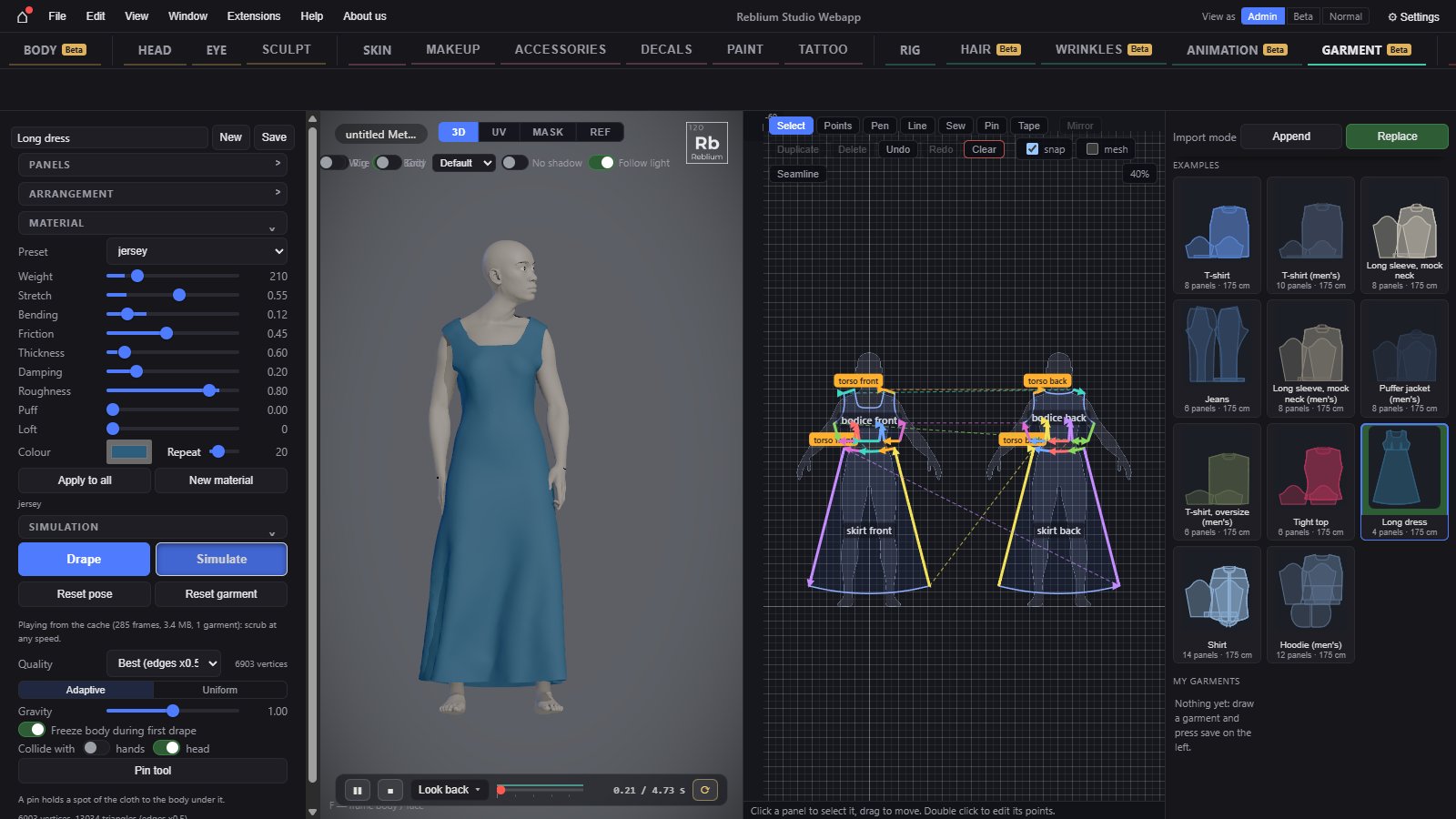
The Garment tab makes real clothes. You draw the flat panels of a sewing pattern, sew their edges together, lay them round a MetaHuman body and let a cloth simulation drape them. Then the clothes follow any animation.
BetaThe Garment tab is a beta feature. Without access its tab still opens and shows the real panel, dimmed and locked, with a card over the view: sign in, say in one line what you would use it for, and press Request early access. See Beta features.
TabGarmentNeedsa MetaHuman with a body (the tab can set one up for you)Leftthe garment: worn list, panels, seams, arrangement, material, simulationMiddlethe pattern pane beside the 3D viewRightthe garment libraryBottomthe playback bar
Before you start
A garment drapes on the MetaHuman body, never on a bare head. What happens when you open the tab depends on what is on screen:
- On the GNM head the tab sets up a body to dress for you. A card says Getting a body to dress and goes through its steps: it opens the sample MetaHuman Ada, adds her body, lays a T-shirt round her and stops at Ready to Drape. It does not drape by itself. This replaces the character on screen, so save first if you want to keep it.
- On a MetaHuman with no body the panel says No body: a garment drapes on the MetaHuman body. Add one to dress it. Press Add body.
- On a MetaHuman with a body you are ready. For quick fitting, start from New Mannequin (fast) on the start panel: a clay body with no skin maps that opens faster. See Start a character.
The workflow
- Pick or draw. Click a garment in the library on the right, or press Draw a panel in the empty pattern pane and draw with the pen (P). See The pattern pane.
- Shape the panels. Edit points with A. Mirror a half with Ctrl+M to get a linked left and right. Draw quilting lines with L.
- Sew. Press S, click an edge, then the edge it joins. A seam turns amber when its two sides differ in length by more than 15 %: the shorter side gathers.
- Arrange. Say where each panel starts round the body: torso front, back, an arm, a leg. Use the arrangement group, the right click menu Arrange on, or the teal dots on the body in the 3D view.
- Choose the fabric. Pick a preset in material: cotton, denim, leather, jersey, silk, chiffon, wool, linen, lycra, fleece, nylon. See Fabric, drape and simulation.
- Drape. Press Drape: the panels are sewn onto the body in the A-Pose and settle until they are still.
- Play it. Pick an animation in the playback bar and press Simulate or play. The cloth is cached frame by frame; a line on the timeline shows how far. Once cached, scrub at any speed.
- Keep it. Name the garment at the top of the panel and press Save: it goes into My garments. Saving the character saves every garment it wears.
The library
The right column lists garments to put on. A click puts one on the body; Shift+click adds its panels to the garment you are editing instead, 5 cm to the right.
| Control | What it does |
|---|---|
| Import mode | Replace (the default): the garment you pick takes the place of the one you are editing; other garments worn stay. Append: it goes on with the one you are editing, on its own layer, like a T-shirt over jeans. |
| Examples | Garments made in the studio, ready to drape: T-shirt, T-shirt (men's), T-shirt, oversize (men's), Long sleeve, mock neck, Long sleeve, mock neck (men's), Tight top, Shirt, Hoodie (men's), Puffer jacket (men's), Jeans and Long dress. |
| My garments | Garments you saved with Save, kept in this browser. ✎ renames one; × deletes it (press it twice). Saving under a name that exists replaces it. |
Worn garments and layers
When more than one garment is on the body, the worn list appears at the top of the panel. The garment you are editing comes first, marked editing. Click another row to edit that one instead; it flashes in the 3D view.
| Control | What it does |
|---|---|
| Layer | 0 to 9. Layer 0 is the innermost. A garment drapes over the body and over every lower layer. A garment with a panel on a leg starts on layer 0, anything else on layer 1. |
| × | Takes that garment off. |
At the top of the panel
| Control | What it does |
|---|---|
| Add body | Shown only when the MetaHuman has no body. Adds one. |
| Name | The garment's name, used by Save. |
| New | A new, empty garment. It asks first: the one on the body is replaced. |
| Save | Keeps this garment in My garments in this browser. |
TipPick A-Pose in the playback bar's clip list, or press Reset pose, before you change the pattern a lot: fitting is easiest on the still rest pose.
Common problems
| What you see | Why | What to do |
|---|---|---|
| Opening the tab replaced my character | On the GNM head the tab loads Ada with a body to dress. | Save before you open the tab. Garments need a MetaHuman body. |
| The garment falls off or flies away | A panel is not sewn, or is arranged far from the body. | Check the seams list; set distance lower in arrangement; add a pin. |
| A seam is amber | Its two sides differ by more than 15 %. | That gathers on purpose. If not, edit the points until the lengths match. |
| The cloth twists along a seam | The second side runs the wrong way. | Select the seam and press F, or ⇄ in the seams list. |