
Fabric, drape and simulation Beta
A garment's fabric is a set of numbers the simulation reads. Drape fits it on the still body; Simulate carries the cloth through an animation and caches every frame so you can scrub it.
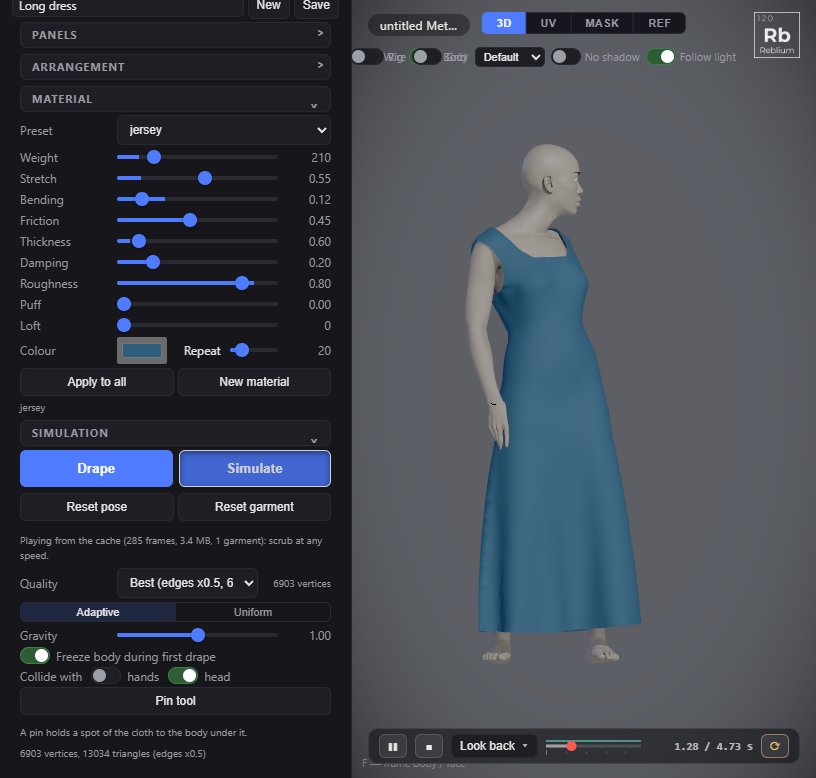
Material
The material shown is the selected panel's, or the first panel's if none is selected. Pick a preset to start; moving any of the physical sliders turns it into custom. Colour and repeat do not.
| Preset | Weight (g/m²) | Stretch | Bending | Notes |
|---|---|---|---|---|
| cotton | 150 | 0.15 | 0.3 | A shirt cotton. The default for a new panel. |
| denim | 400 | 0.05 | 0.7 | Heavy and stiff: broad folds. |
| leather | 800 | 0.03 | 0.9 | The heaviest and stiffest, with a soft sheen. |
| jersey | 200 | 0.6 | 0.15 | A T-shirt knit: stretchy and soft. |
| silk | 60 | 0.1 | 0.05 | Light and shiny, flows. |
| chiffon | 40 | 0.15 | 0.03 | The lightest: floats. |
| wool | 300 | 0.12 | 0.5 | Thick and matte. |
| linen | 180 | 0.08 | 0.35 | Crisp, little stretch. |
| lycra | 190 | 0.85 | 0.12 | A body-con knit for a tight top. |
| fleece | 330 | 0.35 | 0.45 | A heavy brushed sweat, 3 mm thick, for a hoodie. |
| nylon | 70 | 0.03 | 0.22 | A puffer shell with a sheen. Comes with Puff 0.6 and Loft 25 mm. |
| custom | Your own numbers. |
| Control | What it does |
|---|---|
| Weight | Grams per square metre, 30 to 900. |
| Stretch | 0 is a rigid canvas, 1 a jersey. |
| Bending | How much it resists bending. |
| Friction | Against the skin. |
| Thickness | In millimetres, 0.1 to 5. |
| Damping | How quickly it settles. |
| Roughness | 0 shiny, 1 matte. |
| Puff | A quilted fabric's chambers puffing between its internal lines, 0 flat to 1. Only works on panels with lines drawn with the line tool (L). |
| Loft | How far a puffed chamber stands off what is under it at its middle, 0 to 60 mm: the down's thickness. Nothing at the stitch lines. |
| Colour | The fabric's colour. |
| Repeat | How many centimetres a texture repeats over. |
| Apply to all | Every panel wears this material. |
| New material | A material of its own for the selected panel. |
You can change the fabric while the cloth is on the body: the running simulation takes it at once. A finished cache is made again.
Simulation
| Control | What it does |
|---|---|
| Drape | Sews the panels onto the body in the A-Pose and lets them settle until they are still, then stops. This is fitting. Press it again while it sews to stop. |
| Simulate | Drapes first if needed, then caches the clip in the playback bar for every garment on the body and plays it from the cache. Any change caches again by itself. Press it again while it caches to stop. With no clip picked, the cloth simulates live on the still body. |
| Reset pose | Blends the body back to the A-Pose and stops the clip. The garment keeps its shape and settles onto the rest pose. The same as picking A-Pose in the clip list. |
| Reset garment | Puts the selected garment back to its flat panels laid round the body, and holds the body in the A-Pose. Shift+click, or right click, resets every garment worn. |
| Quality | Ultra (edges x0.25), Best (x0.5, the default), Optimised (x1) or Mobile (x1.5). Every panel's mesh edge is multiplied by this. Finer folds more finely and costs more: Ultra has about 16 times the points of Optimised. After a drape the list shows the vertex count. |
| Adaptive, Uniform | Adaptive: each panel at its own mesh edge. Uniform: every panel at the quality's one density. |
| Gravity | Times normal gravity, 0 to 2. |
| Freeze body during first drape | A clip that is playing waits while the garment is sewn on, and plays on once it has settled. On by default. |
| Collide with | hands (off by default) and head (on). Hands are off because a hand on the hip would trap the cloth; a cuff still rests on the wrist. |
| Pin tool | The same as the pin tool in the pane. Each pin is listed with a soft box (a soft pin gives a little) and ×. |
Under the buttons a bar and a line of text say what the simulation is doing: Not draped, Sewing on the body, Draped and settled, Caching every garment, frame f of N, or Playing from the cache.
The cloth cache
In Simulate the cloth is always cached. The whole scene is one cache: every garment, frame by frame, at 60 frames a second. Before the clip starts the body blends from its current pose into the clip's first pose, so the cloth is not jolted.
- A thin line above the playback bar's track shows the cache: bright teal while it caches, faded teal when it is done, amber while it drapes first, and red across the bar when it is out of date. A pale stretch at the start is the blend in.
- While it caches you can pause and scrub back over the frames already made.
- Change a panel, a seam, a pin, the fabric, the quality, gravity, collisions, the body or the clip, and it caches again from the start. Undo back to where it was and the old cache plays again.
- The cache holds up to 300 MB. A long clip at Ultra can fill it: the note then says how far it got.
- The cache is not saved with the character. It is made again after you open it.
The playback bar
The playback bar sits under the 3D view on the Garment and Animation tabs. See Animation for every control. Two matter here:
- A-Pose, first in the clip list, is the rest pose with no clip.
- Blend, 0.25 to 1.5 seconds, shows only while a garment is on the body. A new clip is cached with its first frames blending in from the A-Pose; A-Pose blends the body back to rest over this time.
Grab the cloth
With the cloth simulating live (no clip, or after Reset pose), drag on it in the 3D view to pull a small patch. Each grab is one undo step.
Common problems
| What you see | Why | What to do |
|---|---|---|
| Caching is slow | Ultra on a long clip, or several garments. | Use Best or Optimised while you work; go to Ultra for the final look. |
| The cache line is red | Something changed since it was made. | Press play or Simulate: it caches again. |
| The cloth is caught by the hand | Hands are on in collide with. | Turn hands off. |
| A puffer stays flat | No internal lines, or Puff at 0. | Draw lines with L and raise puff and loft. |