
Body Beta
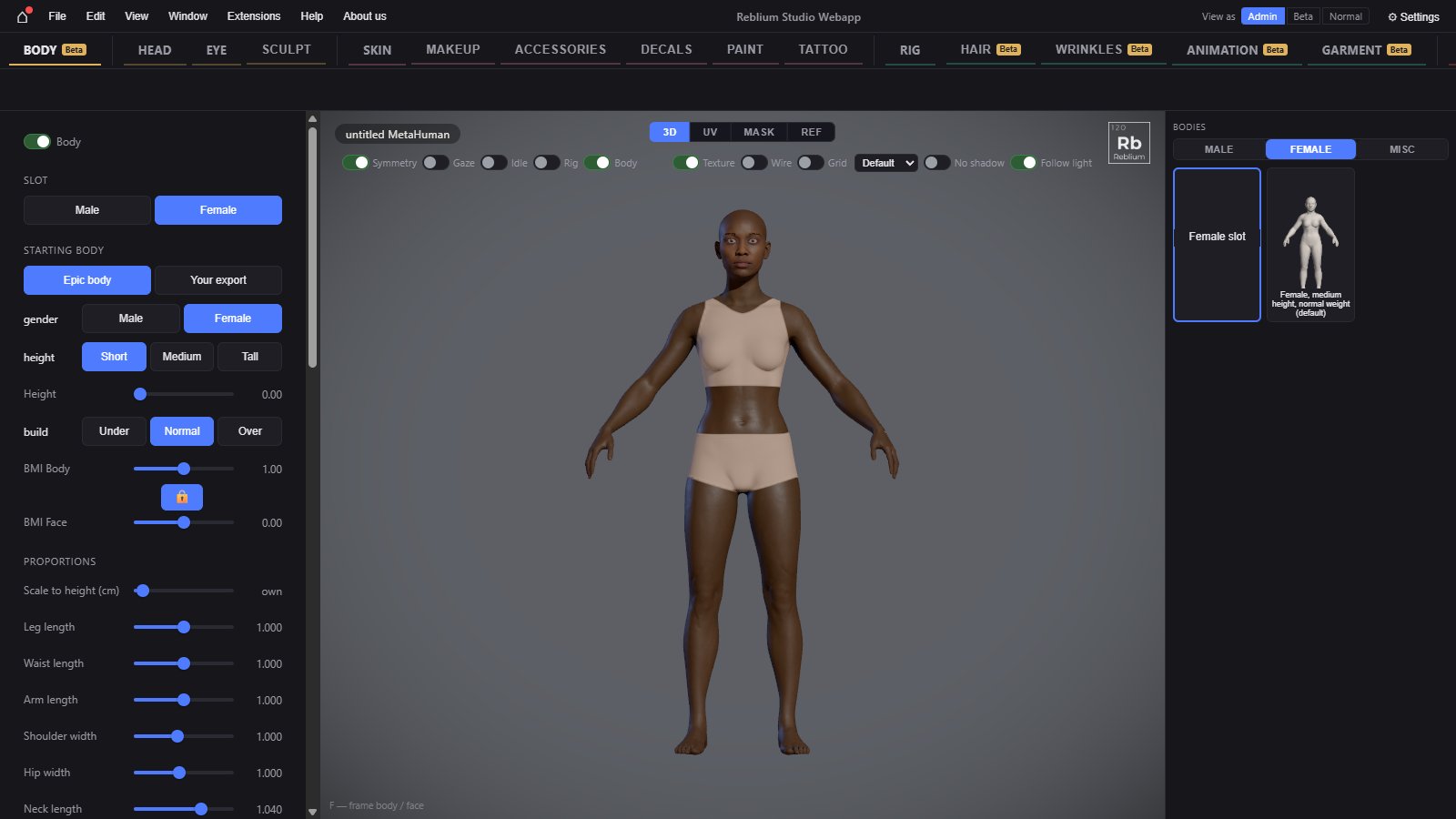
The Body tab puts a full MetaHuman body under your character, joined at the neck, and shapes it: male or female, height, build, BMI and every proportion. A body is what garments drape on and what animations move.
BetaThe Body tab is a beta feature. Without access its tab still opens and shows the real panel, dimmed and locked, with a card over the view: sign in, say in one line what you would use it for, and press Request early access. See Beta features.
TabBodyNeedsa MetaHuman head (a GNM character is converted first)Rightbodies: Male, Female, MiscViewportthe Body switch shows or hides itUndoCtrl+Z
Add a body
- On a MetaHuman, press Add MetaHuman body, or click a body on the right and confirm. A body that matches the character is joined at the neck.
- On the GNM head, the studio asks to Convert to MetaHuman first: your face, hair, makeup and accessories come along, then the body goes under it. See Convert to MetaHuman.
- Or start with a body: New Full (face + body) or New Mannequin (fast) in the MetaHuman column of the start panel.
Usage
- Pick the slot: Male or Female. Each slot keeps its own starting body, proportions and sculpt.
- Under starting body, choose Epic body and set its gender, height (Short, Medium, Tall) and build (Under, Normal, Over). The Height and BMI Body sliders blend between them.
- Set BMI Face with it. With the padlock shut, BMI Body and BMI Face move together.
- Set the proportions: standing height, legs, waist, arms, shoulders, hips, neck and head scale.
- Dress the body in Clothing, then press Save body.
Starting body
| Control | What it does |
|---|---|
| Body | Shows or hides the body. The same switch as Body over the view. |
| Male, Female | The two slots. Each has its own starting body, proportions and sculpt. |
| Epic body | One of the MetaHuman bodies, or a blend of them. |
| Your export | The body of the export you opened, as it came. |
| Gender, Height, Build | Male or female; Short, Medium or Tall; Under, Normal or Over weight. |
| Height | 0 to 2: blends between the short, medium and tall bodies, the joints with them. |
| BMI Body | 0 to 2: blends between the underweight, normal and overweight bodies. |
| Padlock | Shut: BMI Body and BMI Face move together. Open: each on its own. |
| BMI Face | -1 to 1: the face's body mass, thinner to heavier. 0 is the head as it is; double click for 0. Needs a LOD0 MetaHuman. |
Proportions
| Control | What it does | Default and range |
|---|---|---|
| scale to height (cm) | Standing height, soles to the top of the head. The body below the head is scaled to reach it; the head keeps its size. Shows own until you set it. | 175, from 150 to 200 |
| leg length, waist length, arm length | Each part longer or shorter. | 1, from 0.85 to 1.15 |
| shoulder width | 1, from 0.85 to 1.2 | |
| hip width | 1, from 0.8 to 1.25 | |
| neck length | 1.04, from 0.2 to 1.4 | |
| neck offset (cm) | Moves the head forward or back on the neck. | 0, from -8 to 8 |
| head scale | The head's size on the body. | 0.945, from 0.8 to 1.2 |
| own height | No height scale: the body stands at its own height. | |
| reset proportions | This slot's proportions back to none. The starting body and the sculpt are kept. |
NoteHeight (the Epic blend) and scale to height (cm) are two different controls: the first picks a short or tall body shape, the second scales the result to a height in centimetres.
Underwear and tops
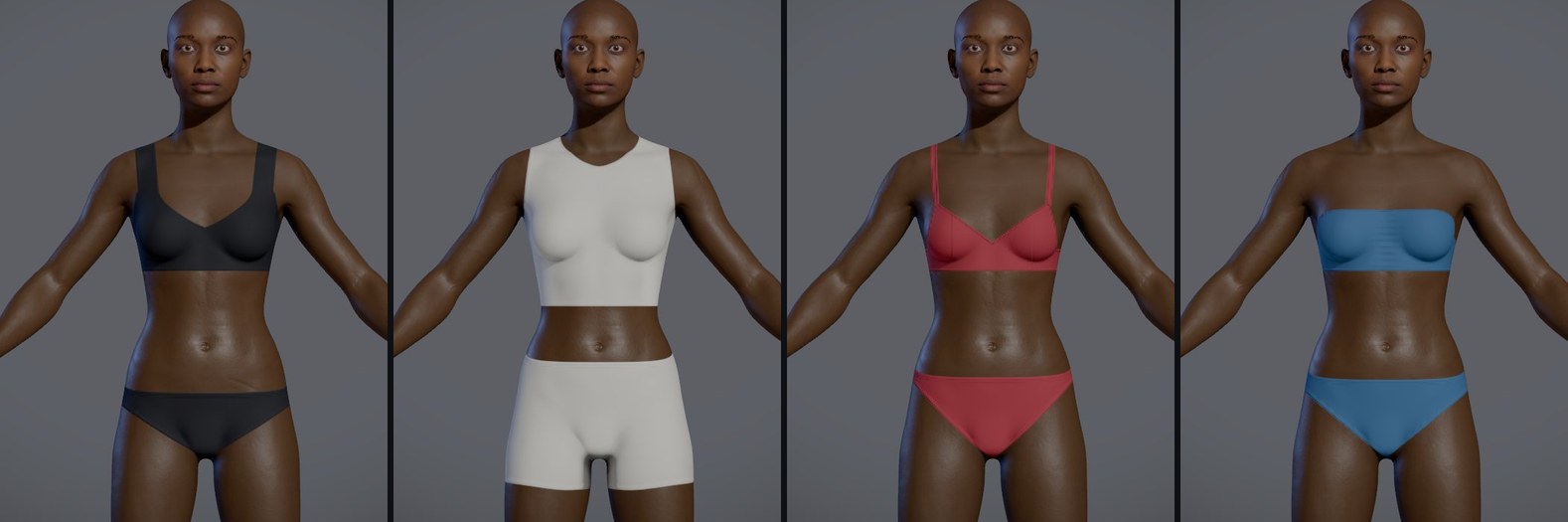
Every body wears underwear, and a top unless you switch it off. Both are drawn on the skin, with no mesh, so they move with the body and fit any build. You set them in the clothing group of this tab: the skin (Nude or Original), the Top with its style (a bra, a crop top or a tank top), the Underwear with its style, and the sliders and colour of each. See Clothing for every control.
neck blend
Where the head meets the body, the head's own neck gives way to the body's neck.
| Control | What it does |
|---|---|
| Amount | How much of the head's neck gives way to the body's: 1 keeps only the head, 0 the head's own neck blended down. |
| Offset (cm) | Moves the line where the head ends. |
| Width (cm) | How far down the neck the blend reaches. |
| Show neck mask | Colours the head green, the blend red to blue, and the body blue, to see what the sliders move. |
Keep it
| Control | What it does |
|---|---|
| Save body | Keeps this slot: starting body, proportions, sculpt layers. Saved with the character too. |
| Export body.dna | Your own body.dna with this slot written in, for Unreal's Import Whole Rig. |
| Remove body | Takes the body off this character. The next save has no body. |
| Helper joints in the skeleton view | With View, Skeleton on, shows the helper and corrective joints too. |
TipSculpt the body on the Sculpt tab: pick Body or Both as the target.
Common problems
| What you see | Why | What to do |
|---|---|---|
| Add MetaHuman body asks to convert | The character is on the GNM head. | A body needs a MetaHuman head: convert, or start from New Full on the start panel. |
| BMI Face is greyed | The head is not a LOD0 MetaHuman. | Use a LOD0 head. |
| The join at the neck shows | The neck blend does not suit this head. | Change the neck blend's offset and width. |