
Bring in a MetaHuman
A MetaHuman comes into the studio from its DNA file: the file Unreal writes with the head's mesh and its whole face rig. Start from a sample, from your own export, or from a ready body.
Start panelFile, New, the MetaHuman column: New Face…, New Full (face + body), New Mannequin (fast)SampleExample: Ada, in the Open a MetaHuman windowMenuFile, Import: MetaHuman DNA…, MetaHuman DNA + textures (export folder)…NeedsLOD0 for the full rig
The ways in
| Control | What it does |
|---|---|
| New Face… | Opens the Open a MetaHuman window, below. |
| New Full (face + body) Beta | Ada with a full MetaHuman body under her, on the Body tab. |
| New Mannequin (fast) Beta | A plain clay MetaHuman with a full body and no skin textures, so it opens faster. Made for clothing and animation. |
| File, Import | MetaHuman DNA… for a single file, MetaHuman DNA + textures (export folder)… for a folder. |
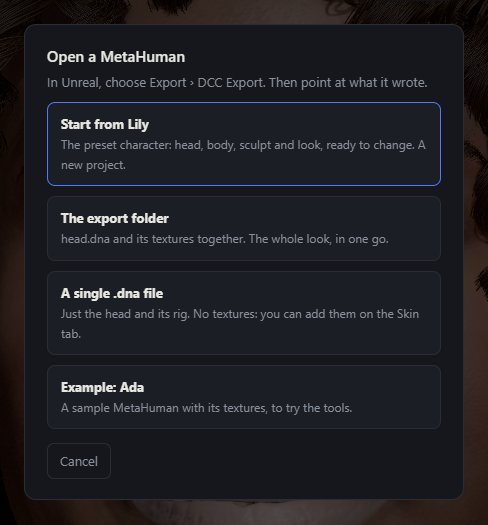
Open a MetaHuman
In Unreal, choose Export, DCC Export. Then point the studio at what it wrote:
| Control | What it does |
|---|---|
| Start from (a preset character) | Shown when the studio has a preset character: head, body, sculpt and look, ready to change, as a new project. |
| The export folder | head.dna and its textures together: the whole look in one go. If the folder has a body.dna, the body comes too. |
| A single .dna file | Just the head and its rig, with no textures. Add them in the shading group of the Skin tab. |
| Example: Ada | A sample MetaHuman with its textures, to try the tools. It opens as an untitled MetaHuman. The samples belong to Epic Games. |
| Cancel | Closes the window. |
What you get
- The head with its own mesh, UV and face rig. The Rig tab shows every control; see MetaHuman Rig and Shading.
- The GNM head stays hidden underneath. The hair tools grow on the MetaHuman's own skin.
- Your files are read in the browser. Your own DNA is kept in this browser, not uploaded.
LOD
A MetaHuman export has several levels of detail. The studio reads LOD0, the full head. Converting a face, Import MetaHuman DNA in the Base group and the DNA export all need LOD0. A head brought in as an OBJ has no rig.
Common problems
| What you see | Why | What to do |
|---|---|---|
| This DNA file has no head mesh at LOD 0 | The file holds a lower LOD only. | Export again from Unreal with LOD0. |
| The head is grey | A single .dna carries no textures. | Open the export folder instead, or add the maps in the Skin tab's shading group. |
| There is no body | Only a head was exported. | Add one on the Body tab. |