
Animation Beta
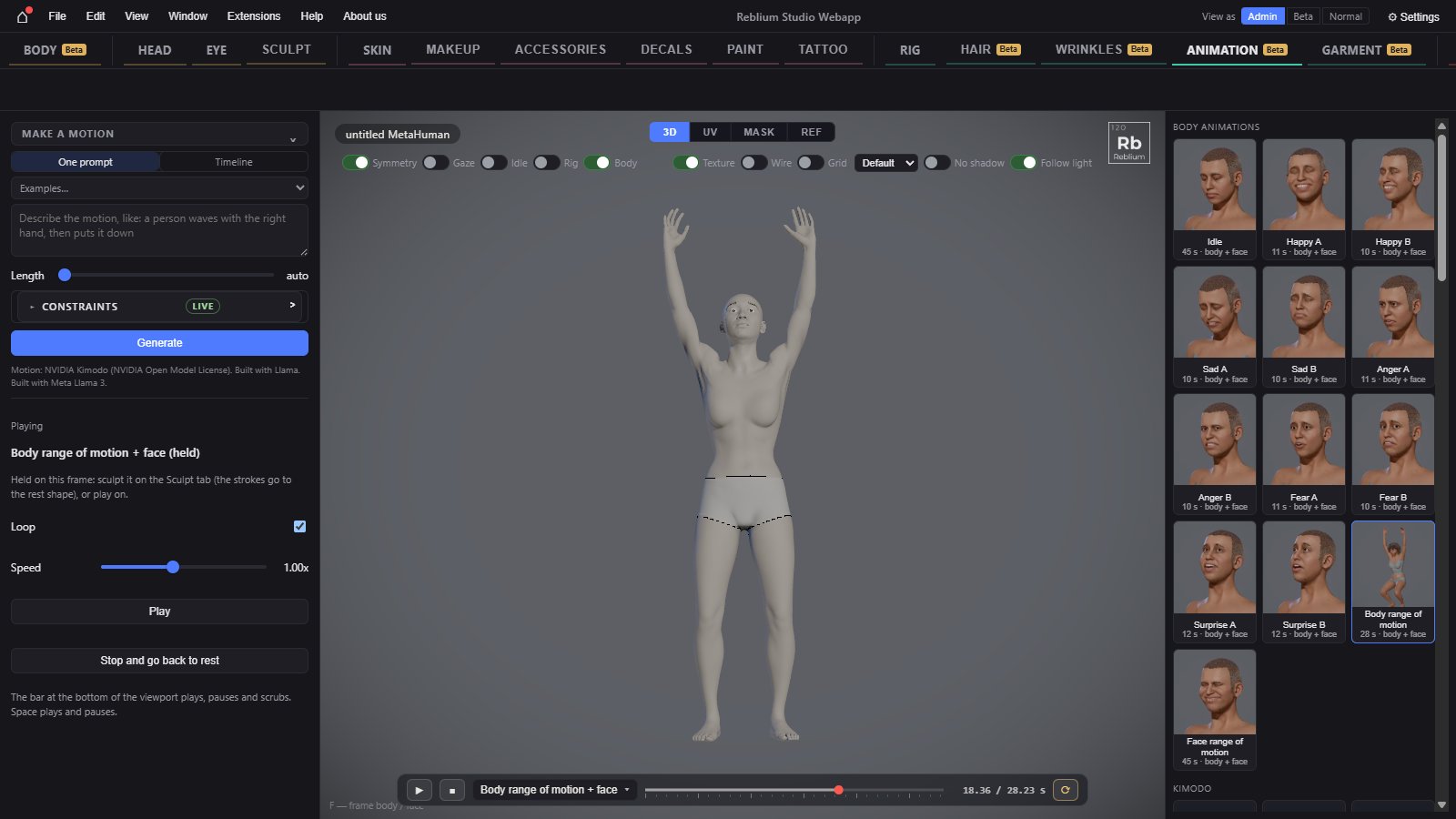
The Animation tab plays animations on a MetaHuman: body loops with the head and face riding them, and motions made from a sentence. The playback bar under the view plays, pauses and scrubs them.
BetaThe Animation tab is a beta feature. Without access its tab still opens and shows the real panel, dimmed and locked, with a card over the view: sign in, say in one line what you would use it for, and press Request early access. See Beta features.
TabAnimation, MetaHuman onlyLibrarythe right panel: body animations, kimodo, my animationsPlaybackthe bar under the view; Space plays and pauses
Usage
- Open Animation on a MetaHuman with a body. With no body, only the head and neck follow the clip: press Add MetaHuman body.
- Click an animation on the right. It plays at once.
- Use the playback bar: play and pause, stop, scrub, loop. Click the clip's name to pick another, or A-Pose.
- Press Hold pose to pause on a frame and sculpt it on the Sculpt tab.
The library
| Control | What it does |
|---|---|
| Body animations | Body loops that play on the body with the head riding them. Some carry a face part too, marked body + face. |
| Kimodo | Motions made from a sentence and put on the MetaHuman body. Body only. The tile's tooltip shows the sentence. |
| My animations Beta | Motions you made with Make a motion. Hover a tile to rename (✎) or delete (×, press twice). See Make a motion. |
The left panel
| Control | What it does |
|---|---|
| Playing | The clip that plays, or nothing; held while paused. |
| Loop | Plays the clip over and over. Off, it holds on its last frame. |
| Speed | 0.25 to 2 times. |
| Hold pose | Pauses on the frame on screen. Sculpt it on the Sculpt tab: the strokes go to the rest shape. The button then reads Play. |
| Stop and go back to rest | Stops the clip: the body, head and face back to rest. |
The playback bar
The bar under the view, on the Animation and Garment tabs.
| Control | What it does |
|---|---|
| ▶, ❚❚ | Play and pause (Space). |
| ■ | Stop: back to the start, the character at rest. |
| Clip name | Opens the clip list: A-Pose (the rest pose, no clip) first, then Body animations, Kimodo and My animations, each with its length. At its foot, Speed and, while a garment is on the body, Blend. |
| Track | Drag to scrub. A tick every second, a longer one every 5 seconds. With a garment, a thin line above it shows the cloth cache. |
| Time | Where you are and how long the clip is. |
| ⟳ | Loop. |
NoteWhile the MetaHuman rig's dots are live (the Rig switch or expert mode), the playback bar waits.
Common problems
| What you see | Why | What to do |
|---|---|---|
| Only the head moves | There is no body. | Press Add MetaHuman body. |
| The Animation tab is missing | The character is on the GNM head. | Animation needs a MetaHuman: convert first. |