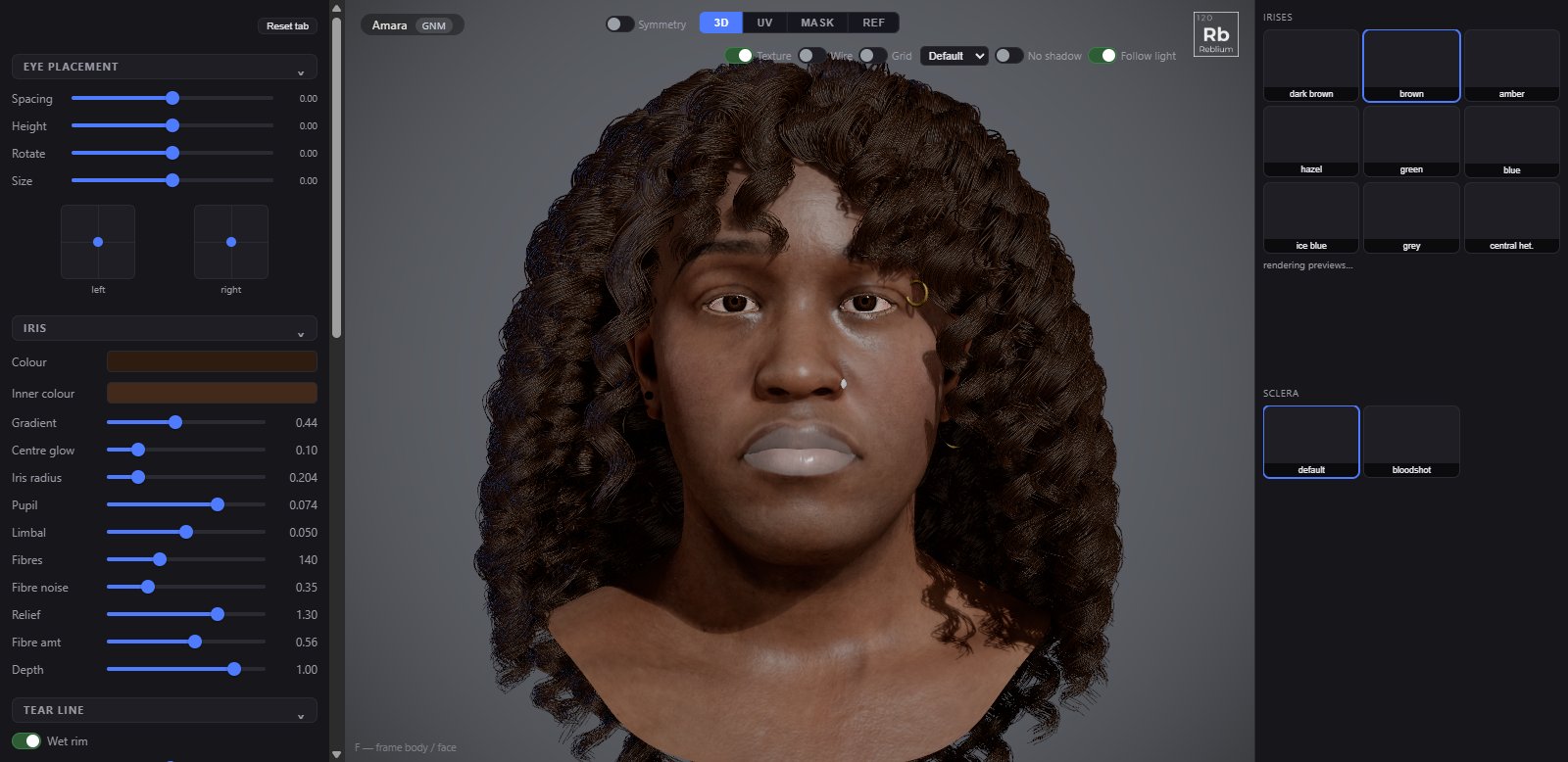
Everything about the eyes but the lashes (on the Hair tab) and the tears (on the Skin tab). The iris is drawn live, not painted, so every control changes it as you drag.
TabEyePresetsirises and sclera, in the right panelPlacementthe sliders and the two pads under them
The Eye tab: eye placement and the iris on the left, the iris and sclera presets on the right.
Usage
Click an iris in the right panel: dark brown, brown, amber, hazel, green, blue, ice blue, grey or central heterochromia.
Tune it under iris: the outer colour, the inner colour around the pupil, and gradient for how far the inner colour reaches. pupil is the dilation.
Place the eyes with the eye placement sliders. The two pads add a fine offset to each eye; double click a pad to centre it.
Under tear line, the wet rim along the lids is on by default.
eye placement
Control
What it does
Spacing, Height
Both eyes toward each other or apart, and up or down.
Rotate
Turns both eyes toward the nose or away.
Size
The eyeball and its socket together.
Left, Right pads
The eye on this side of the screen: drag for a fine offset on top of the sliders; double click to centre.
iris
Control
What it does
Default and range
colour
The outer iris, at the limbus.
dark brown
inner colour
The inner iris, around the pupil. An amber centre inside a blue rim is central heterochromia.
a warmer brown
gradient
How far the inner colour reaches toward the limbus.
0.56
centre glow
Brightens the pupil zone and darkens the rim.
0
iris radius
The outer edge of the iris on the eyeball.
0.204
pupil
Pupil radius: the dilation.
0.074
limbal
The dark ring at the outer edge of the iris.
0.048, up to 0.1
fibres, fibre noise
How many radial fibres, and how much whole sectors bend off an even pitch.
140, 0.35
relief, fibre amt
How much the iris's height bends the shading, and the fibres' contrast.
1.3, 1
depth
How far the iris sits behind the cornea: the parallax as the head turns.
1
tear line
Control
What it does
Wet rim
The wet film along the lid margin, on or off. On by default.
Radius, Arc, Rotation
The film's thickness and shape along the lid.
Amount, Break up, Break scale
How present the film is, and how it pools and thins in patches.
Roughness
Low is a tight, bright streak; high a broad sheen.
Flip normals
Two wet looks: inward gathers light into the crease, outward lights it like a rod.
The red behind the vessels: how strong, how close to the iris, how soft, and its tint.
0.94, 0.42, 0.71
cornea
Control
What it does
Roughness
The cornea's surface: 0.085 by default.
Env amt, Env fresnel, Reflect env
How much of the environment the cornea reflects. Keep reflect env on under an HDRI, or the eyes look blank.
Coat IOR, Bend IOR, Refraction, Strength
The glassy coat: its reflection, how strongly it bends the iris behind it, and how present it is.
eyeline
Control
What it does
Eyeline tint, Tint amount
A colour along the lash line, moving with the lid.
Grow / shrink, Mask blur
The band's width and feather.
On a MetaHuman
A MetaHuman keeps its own painted eyes. The Eye tab shows hue shift, saturation, brightness, tint and tint strength to recolour them, show iris edge, reset (back to its own eye as imported) and more eye shading.