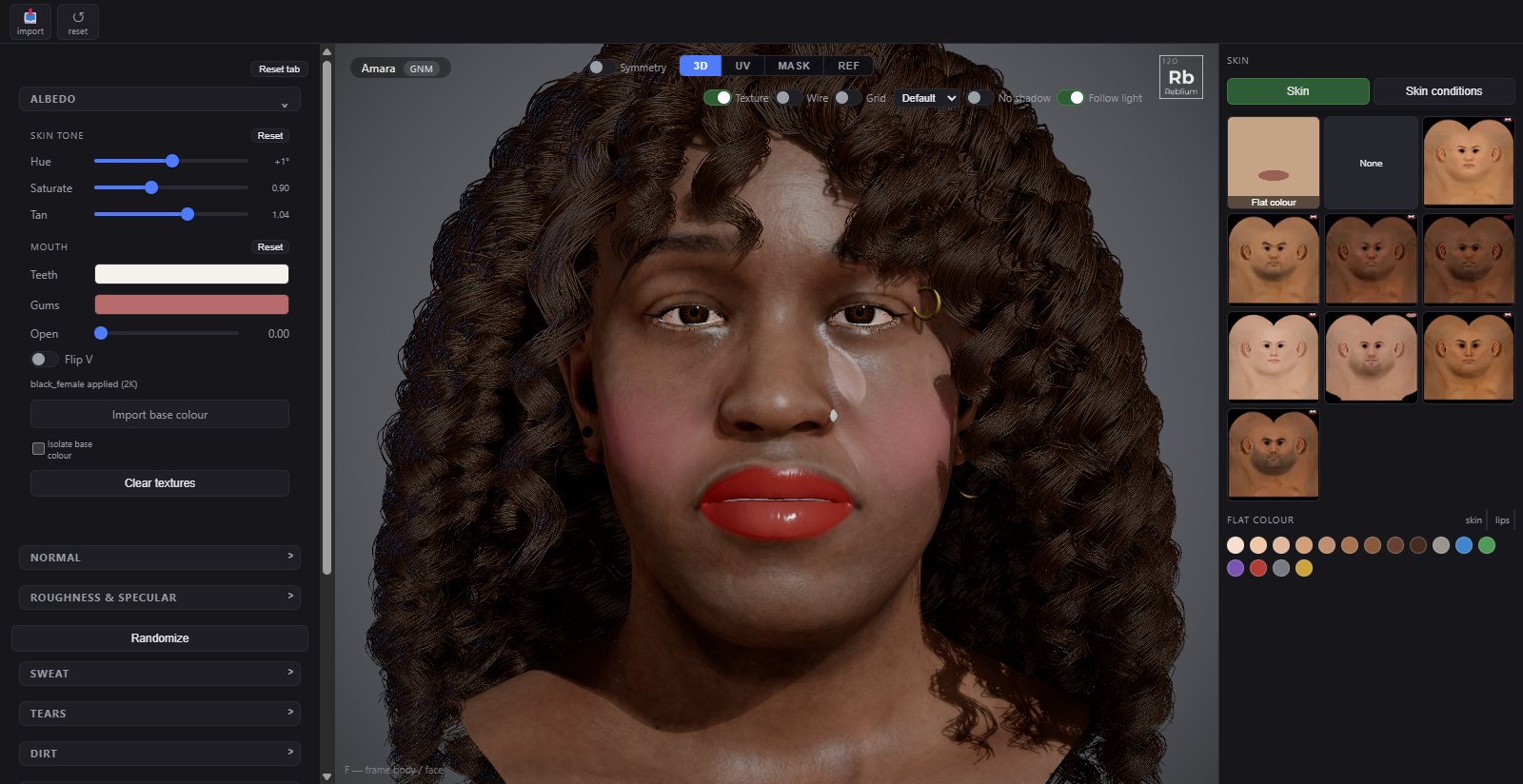
The Skin tab is the surface of the face: the base colour map and its tone, the normal detail that makes pores and age, the roughness that makes it shine or matte, and on top of all that a living layer of sweat, dirt and skin conditions drawn by the shader, with nothing painted: sweat, tears, dirt, conditions and patterns.
TabSkinShelfimport a base colour, reset the imported texturesSectionsalbedo, normal, roughness & specular, sweat, tears, dirt, one per condition, patternsRight panelSkin and Skin conditionsAgeshared with the Head tab
The Skin tab with the albedo section open, and the skins and flat colours in the right panel.
How it works
Eight skin maps ship with the studio, one per gender and ethnicity, and Generate GNM picks the right one. The right panel's Skin tab lists them, with Flat colour: one colour for the whole skin, with no texture and no pores, from the swatches under the tiles. On top of the map, skin tone warms, cools, pales or tans it. The normal section adds the fine relief: a base normal map, and a detail map whose strength is the character's age. Roughness & specular set how the light comes off the skin, by region: a forehead shines more than a cheek.
The sections after that are the wet layer: sweat, dirt and the conditions. They are computed by the shader every frame in the skin's own coordinates, so they follow the face, react to gravity and cost no texture. new pattern under each rolls a different arrangement of the same amount.
Options
Albedo
Control
What it does
Default and range
Hue
Rotates the hue. A few degrees warms or cools a skin; large amounts leave skin entirely.
Lightness. Below 1 tans and darkens, above 1 lightens. This is what the tone model drives.
0.95, from 0.3 to 1.5
reset (skin tone)
Back to the map as authored.
Teeth
Enamel. Age, coffee and tobacco pull this yellow; a pure white reads as veneers.
an off-white
Gums
Gum colour. Follows the skin more than the teeth do.
a muted red
Open
Opens the jaw so the teeth, gums and tongue are visible while you set their colours. Not saved.
0, from 0 to 1
import base colour
Your own colour map for the skin. flip V for maps authored with the opposite V convention; isolate base colour shows the map alone, unlit.
Clear textures
Removes the imported maps and goes back to the shipped ones.
Normal
Control
What it does
Default and range
import normal
Your own normal map. flip green (base) for DirectX maps.
Strength
How strong the base normal is.
1, from 0 to 3
detail map
The fine pore and wrinkle relief tiled over the face; ✕ removes it.
shipped
Age
The detail's strength, the same age as on the Head tab, 18 to 70. The bands are uneven because skin changes fastest in middle age.
from 0 to 1
detail by region
How much detail each region carries: forehead, cheeks, nose, nostril, lips, ear, eyes, scalp, eyeline. Multiplies the strength. Reset regions puts them back.
on
Roughness & specular
Control
What it does
Default and range
Roughness
How matte the skin is overall. The base for every region the masks do not cover.
0.49, from 0 to 1
Specular
How strong the highlight is.
0.49, from 0 to 1
Metalness
A small metallic term that tightens the highlight.
0.16, from 0 to 1
Fresnel
Grazing-angle sheen: the thin oily film goes mirror-like as the surface turns away from you, which is why a cheek catches light edge-on.
0, from 0 to 1
Fresnel falloff
How sharply the sheen is confined to the rim. 5 is physical; lower spreads it across the face and reads as greasy.
5, from 1 to 8
roughness by region
A roughness per region: forehead, cheeks, nose, nostril, lips, ear, eyes, scalp, eyeline. Reset regions puts them back.
on
affect roughness
How much the cavity map perturbs the roughness: pores read rougher than the skin between them.
0.36, from 0 to 1
Tiling
How many times the cavity map repeats across the face.
12, from 1 to 40
isolate cavity
Shows the cavity map alone, tiled as the shader samples it.
off
Sweat
Control
What it does
Default and range
Density
How much sweat. 0 is dry skin.
0, from 0 to 1
Bead size
How big the beads are.
1, from 0.3 to 3
Sweat rate
How fast beads form, grow and run.
0.6, from 0.05 to 3
Running
How many beads get heavy enough to run down, leaving a streak.
0.35, from 0 to 1
Run speed
How fast a running bead slides.
1, from 0.1 to 3
Focus
0 spreads it over the whole face; 1 gathers it on the forehead, upper lip, nose and temples.
0.6, from 0 to 1
Sheen
A wet film over the sweating skin, glossier than dry skin.
0.5, from 0 to 1
Water roughness
How rough the water is. Lower is a sharper, brighter glint.
0.06, from 0 to 0.5
Darken
Wet skin is a little darker than dry skin.
0.12, from 0 to 0.5
Bump
How strongly beads and streaks bend the light.
1, from 0 to 3
Tears
Tears run from the corners of the lower lids, with every blink while Crying is on.
Control
What it does
Default and range
Crying
Crying on or off. While it is on, every blink releases a new tear from each eye that is not set to off.
off
left eye, right eye
Where that eye's tears come from, always a corner of the lower lid: one of the two at random for each tear, the inner corner, the outer corner, or one from each corner (the default).
both corners
tear rate
New tears a second from each corner that is on, blinks or not. 0 is only with the blinks and cry now.
0, up to 2
drop size, speed
How big each tear is and how fast it runs.
welling
Seconds a tear sits swelling on the lower lid before it runs.
trail
Seconds the wet streak takes to dry behind a tear.
wander
How much the tear's path winds on its way down.
cry now
Releases a tear now from every corner that is on.
Dirt
Control
What it does
Default and range
Density
How dirty. 0 is clean skin.
0, from 0 to 1
Size
How big the blotches are. Low is a few large smears; high is fine mottling.
6, from 1 to 20
Specks
Fine dark specks scattered over the skin.
0.5, from 0 to 1
Speck size
How big the specks are; most fine, a few coarse.
1, from 0.3 to 3
Smears
Brush-like smears of grime, each its own way, as if wiped by a hand or a sleeve.
0.4, from 0 to 1
Wobble
How many smears bend and wander, and how much.
0.6, from 0 to 1
In creases
Gathers the grime where the skin is recessed. 0 spreads it evenly.
0.5, from 0 to 1
Roughness
How matte the dirt is. Dry dirt is very rough.
0.85, from 0.3 to 1
Grit
How much the specks stand up from the skin.
0.5, from 0 to 2
Colour
What the grime tints toward. Mud is dark brown, soot near black, dust a pale grey.
dark brown
new pattern
A different pattern of blotches, specks and streaks, the same amount.
Conditions
One section each. The right panel's Skin conditions tab has one click looks: clean, freckles, moles, rosacea, acne, eczema, vitiligo, sweaty, dirty, worn out and sun kissed. The Generator's Skin conditions padlock rolls mild moles, freckles, acne and rosacea; eczema and vitiligo are only ever set here.
Section
Controls
Moles
Count (0 to 16), Size, Raised (how far they stand up), Colour, new pattern.
Freckles
Density, Size, Focus (0 the whole face, 1 the nose and cheeks), Variation (some faint, some dark), Colour, new pattern.
Acne
Amount, Size, Redness, Heads (how many carry a pale head), Raised, Focus (1 keeps them to the forehead, cheeks, nose and chin), new pattern.
Eczema
Coverage, Patch scale (higher is smaller, more numerous patches), Redness, Scaling (dry pale scale on the patches), Texture (how deep the cracks read), Focus (1 around the eyes and the mouth), new pattern.
Rosacea
Flush (how red the cheeks and nose are), Spread, Vessels (fine broken vessels in the flush), Bumps, new pattern.
Vitiligo
Coverage, Patch scale, Edge softness, Paleness (how completely the pigment is gone), Focus, Colour, new pattern.
Patterns
Patterns paint an animal or fantasy pattern over the skin, by the shader: + pattern adds a layer, up to four. Each layer has a type (Dots, Leopard, Tiger stripes, Zebra stripes, Cow patches, Giraffe, Fish scales or Snake scales), its colours, amount, scale, variation, coverage and edge softness, and can follow the skin's flow lines.
NoteThe pattern of a condition is not saved: a character reloads with the same amounts and a fresh arrangement. The amounts are what you author.
TipKeep the conditions mild. A count of two or three moles and a freckle density under 0.3 read as a person; more reads as a make-up effect.
On a MetaHumanThe skin tools work in the MetaHuman's own UV. A GNM skin goes on as a colour tone over the MetaHuman's own colour map; its surface detail stays the MetaHuman's. A shading group joins this tab with the MetaHuman's own skin, eyes, teeth, lashes and tear line: see MetaHuman Rig and shading.
Common problems
What you see
Why
What to do
The skin turned purple or green
Hue is far from 0.
Bring Hue back within a few degrees.
The face is greasy all over
Fresnel falloff is low, or roughness is low everywhere.
Raise Fresnel falloff toward 5; raise the region roughness.