
Make a motion Beta
Make a motion turns a sentence into a body motion for your character: a person waves with the right hand, then puts it down. The motion is put on your body, plays at once and is kept in my animations.
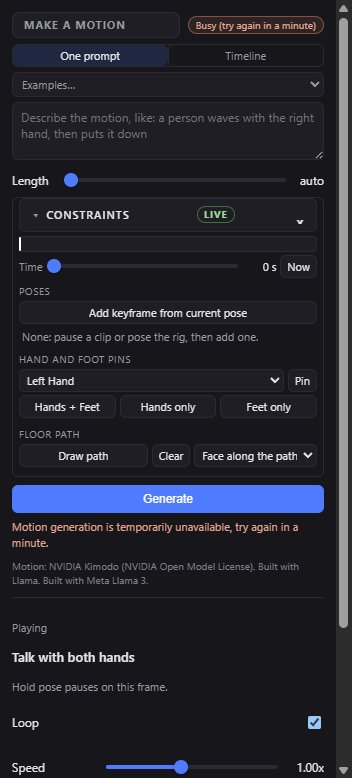
One prompt
- Wait for the chip to say Ready. The motion model sleeps when nobody uses it and wakes in about a minute.
- Type what the body does, or pick one in Examples… and change it.
- Set Length, up to 10 seconds, or leave it on auto.
- Press Generate (or Ctrl+Enter). The motion plays on the body and lands in my animations.
- Same again makes the same motion again; Try another makes another take of the same words.
If your words describe several moves, they come back as editable chips, each with its seconds, made into one motion. Use as timeline turns them into timeline segments.
Timeline
Timeline makes several prompts in a row into one motion, up to 6 segments of 0.5 to 10 seconds each. Each segment has its words and its seconds; drag its number to reorder, or use ▲ ▼ and ×. + segment adds one. Press Generate timeline.
Constraints
Open Constraints above Generate to steer the motion. The chip says which kinds the motion service follows right now; the others are kept and the motion is made from the words.
| Control | What it does |
|---|---|
| Time | Where on the motion's length you are adding a constraint. Now takes the time of the clip on the body. |
| Add keyframe from current pose | The body as it stands now (a paused clip, the rig, or rest) becomes a pose the motion passes through at this time. |
| Hand and foot pins | Pin a hand, a foot or the hips where it is now, at this time, from and until a time. Hands + Feet, Hands only and Feet only pin several at once. Drag the red dot in the view to move a pin. |
| Floor path | Draw path, then click points on the floor in the view. Choose whether the body faces along the path, keeps facing forward, or lets the model choose. |
Limits
- 20 motions a day, one at a time. The panel says how many are left.
- Body only: the face is not animated by a made motion.
- Signing in is needed to make and keep motions. Everything in the library still plays when the generator is offline.
Common problems
| What you see | Why | What to do |
|---|---|---|
| Generate is greyed | The model is waking up, you are not signed in, or there are no motions left today. | Wait for Ready, sign in, or try tomorrow. |
| Add a body first | A motion moves the body. | Press Add MetaHuman body. |