
Speech Beta
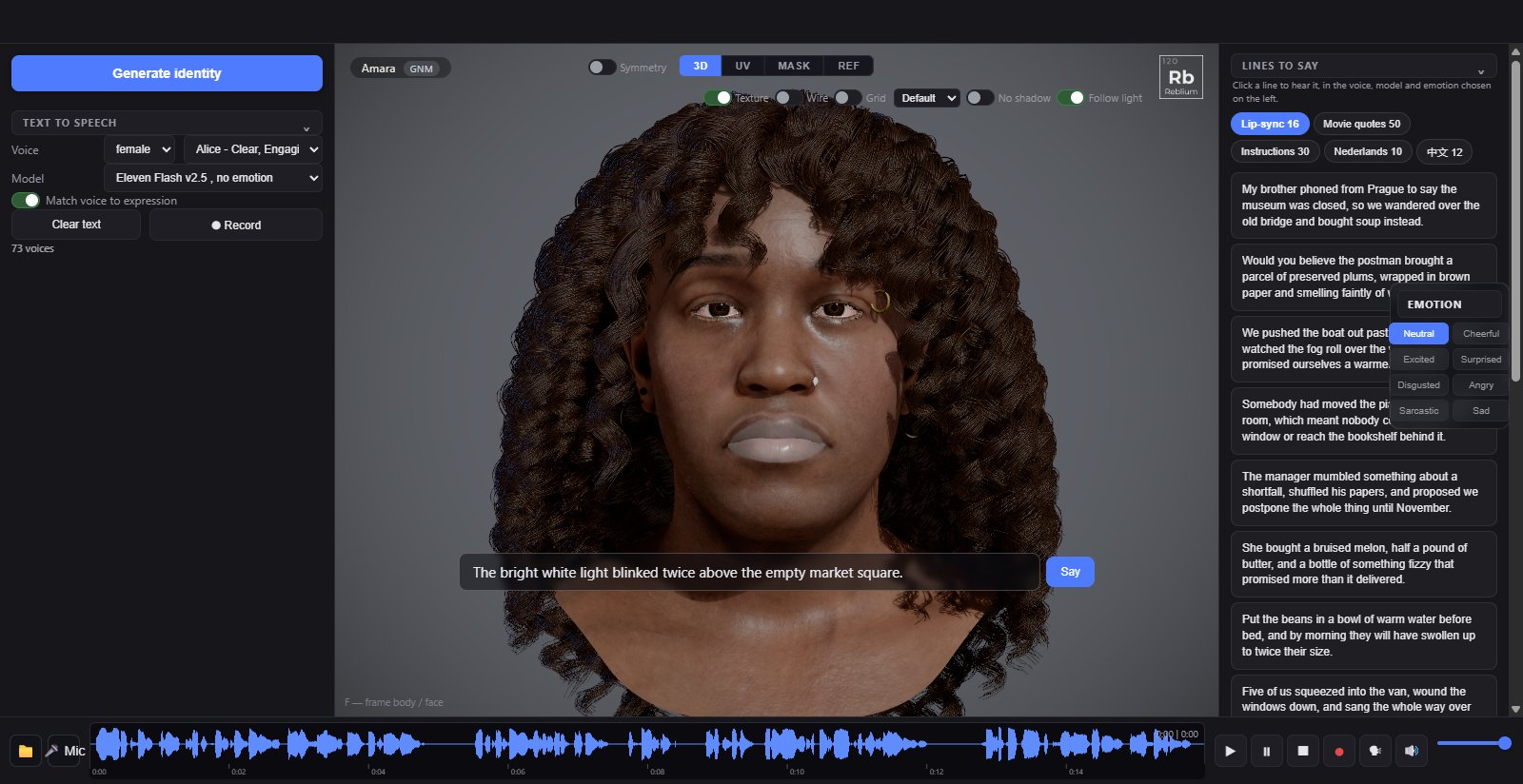
Speech gives the character a voice: type a line, pick a voice and an emotion, and the face says it with its lips in sync. Record writes the performance to a video. The example phrases on the right are ready-made lines to try.
BetaThe Speech tab is a beta feature. Without access its tab still opens and shows the real panel, dimmed and locked, with a card over the view: sign in, say in one line what you would use it for, and press Request early access. See Beta features.
NoteSpeech works on the GNM head. It is not offered while a MetaHuman is open.
TabSpeech, in the stripHeadthe GNM head onlyVoicethe text to speech sectionEmotionthe pills over the viewportRecordthe Record button, and the transport bar under the viewport
Usage
- Open Speech. Type a line in the box, or click one of the quick lines under Say something, or press Generate to have a fresh line written for you.
- Pick a Voice and a Model. The model with emotion reads the emotion tags; the others are faster and flat.
- Pick an emotion pill over the viewport: cheerful, excited, surprised, disgusted, angry, sarcastic, sad, or neutral. It sets the face and, with match voice to expression on, the voice.
- Press play in the transport bar: the line is spoken and the lips follow. The waveform shows the clip; drag in it to scrub.
- Press Record to write the face and the audio together to a video file: it starts recording, speaks the line, and stops when the audio ends. The frame rate is the export fps under Settings.
- Mic records your own voice instead of a synthesised one, and the folder button loads an audio clip; the face lip-syncs to either.
Options
| Control | What it does |
|---|---|
| Generate identity | Rolls a new face: gender, ethnicity, age, skin, eyes and a matching voice. |
| What to say, Generate | The menu picks the kind of line: a lip-sync sentence, a movie quote, instructions, a line in Dutch or in Chinese. Choosing writes a fresh line straight away; the dice writes another. |
| Speak | Says the line in the box. |
| Voice | The synthesised voice, with a description of each. |
| Model | The speech model: Eleven v3 reads emotion; Multilingual v2, Flash v2.5 and Turbo v2.5 are faster and read none. |
| match voice to expression | Drives the voice from whichever expression slider is highest. Off sends exactly the line as typed. |
| Record | The face and the audio together, to a video file. Starts recording, speaks the line, stops when the audio ends, so the mouth you see is exactly the mouth in the file. |
| Clear text | Empties the sentence box. |
| Emotion pills | neutral clears every expression; the others set a face and send matching tags to the voice: cheerful sends happily and cheerfully, angry sends furious and shouting with the line upper-cased, and so on. |
| Example phrases | Ready-made clips on the right: press play to hear one and watch the lips. |
| Say something | Quick lines that fill the box. |
| Transport bar | Under the viewport: the folder loads an audio clip, Mic records yours, then play, pause, stop and rewind, record the viewport with audio, a button that opens the Speech panel, mute and the volume, and the waveform with a time readout. |
NoteThe voices and the line writer run on the hosted studio. A copy served from a plain folder has no voice, and the face lip-syncs only to clips you load or record yourself.
TipSet an emotion in Expression before speaking: speech adds on top of it, so a slight smile stays through the line.
Common problems
| What you see | Why | What to do |
|---|---|---|
| Nothing plays | The line is empty, or the voice service is unreachable. | Type a line; check you are on the hosted studio. |
| The voice sounds flat | The model has no emotion, or match voice to expression is off. | Pick Eleven v3; switch the match on. |
| The video is shorter than the line | Recording stops when the audio ends. | Expected. Add a pause at the end of the line if you want a tail. |