
Export
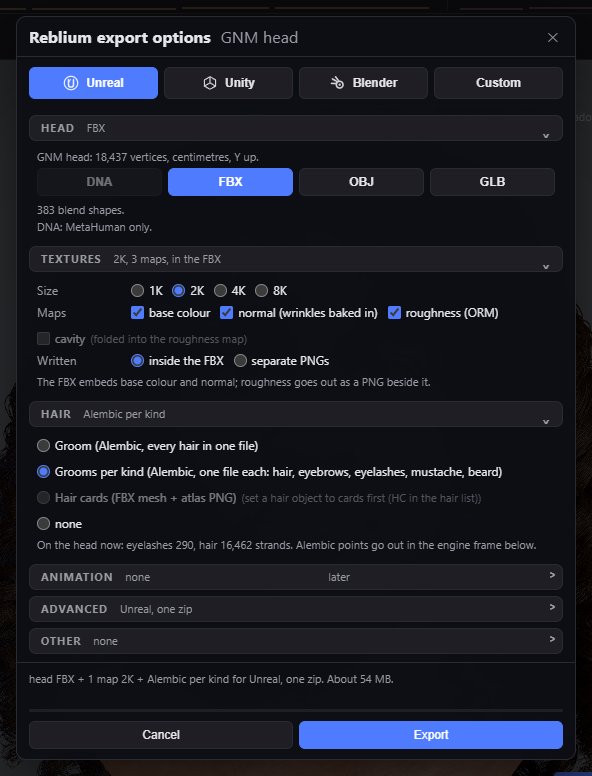
File, Export… (Ctrl+E) opens one panel with everything you can take out of the studio: the head, its textures and its hair, set up for the program you are going to. It works on the GNM head and on a MetaHuman.
Usage
- Press Ctrl+E. The title says which head you are exporting: GNM head or MetaHuman.
- Pick the preset for your program: Unreal, Unity or Blender. It sets the axes, units, formats, texture size and hair the way that program's import expects.
- Change anything you like: the preset becomes Custom. Your last choice is remembered.
- Check the summary at the bottom: what goes out and about how big. Press Export.
The presets
| Preset | Head | Textures | Hair |
|---|---|---|---|
| Unreal | FBX (DNA for a MetaHuman opened from its DNA file) | 2K, inside the FBX | Grooms per kind |
| Unity | FBX | 2K, inside the FBX | Groom (one Alembic) |
| Blender | FBX | 2K, separate PNGs | Groom (one Alembic) |
All three write one zip.
Head
| Control | What it does |
|---|---|
| DNA | MetaHuman only: your DNA with the sculpt written back, the whole rig. Needs a MetaHuman opened from its DNA file, at LOD0, and the Unreal frame. |
| FBX | On the GNM head: the head with its 383 blend shapes. On a MetaHuman: blend shapes, the studio's emotions and ARKit, posed through the rig. |
| OBJ | On the GNM head: no joints or blend shapes. On a MetaHuman: head, eyes and teeth with the head's baked maps. |
| GLB | The head and its baked textures in one file, in metres. No hair strands. |
Textures
| Control | What it does |
|---|---|
| Size | 1K, 2K, 4K or 8K. A size your graphics card cannot bake is greyed. |
| Maps | Base colour, normal (with your wrinkles baked in), roughness. Cavity is folded into the roughness map. |
| Written | Inside the FBX, or as separate PNGs. |
The maps are baked from everything on the skin, on both heads; on a MetaHuman into its own UV.
Hair
| Control | What it does |
|---|---|
| Groom (Alembic) | Every hair in one .abc file. |
| Grooms per kind (Alembic) | One .abc file each for hair, eyebrows, eyelashes, mustache and beard. |
| Hair cards (FBX) | Every hairstyle set to Haircard as a mesh, with the strand texture as a PNG. Greyed until you switch a hairstyle to cards in the Hair Manager: see Hair cards. |
| None | No hair. |
Hair goes out in the engine frame below. A GLB carries no strands. A hairstyle set to Haircard still goes out as strands in the Alembic options.
Animation
Speech writes the last spoken line as blend shape curves in an FBX, with its audio, on the GNM head. Idle, emotion clips and rig animation are coming.
Advanced and Other
| Control | What it does |
|---|---|
| Engine frame | Unreal, Blender or Unity: the up axis and units each expects. The file names say which. |
| Units | FBX and OBJ in centimetres, GLB in metres; Alembic in centimetres for Unreal and Unity, metres for Blender. |
| Download | One zip, or separate files. |
| Other | The fit preset, the wrap markers, the hair mask and the paint layer, each on its own file outside the zip. |
File names
Files are named for the head, the engine frame and the time, such as gnm-head-unreal-2026-10-14-10-30-00.fbx, reblium-hair-unreal-….abc, reblium-haircards-unreal-….fbx with hair_cards_atlas.png, or metahuman-… for a MetaHuman. The zip is reblium-export-….zip.
Common problems
| What you see | Why | What to do |
|---|---|---|
| Hair cards is greyed | No hairstyle is set to Haircard. | Flip a hairstyle's switch to Haircard in the Hair Manager. |
| DNA is greyed | The head is GNM, not a LOD0 MetaHuman from a DNA file, or the frame is not Unreal. | Use the Unreal preset on a MetaHuman opened from its DNA. |
| The hair is lying on its side in my program | The engine frame does not match the program. | Pick that program's preset, or set Engine frame. |
| 8K is greyed | Your graphics card cannot bake that size. | Use 4K. |